

New EVO HD and EVOPlus application for Airspace Coloso Evolution video recorders
By Demes, company specialized in the distribution of intrusion security technologies, fire detection, access control and closed circuit television, has added a new EVO HD application to its catalog (iPad/Android Pad) y EVOPlus (iPhone/Android phone) for Airspace Coloso Evolution video recorders, with the possibility of remote playback and Push Notification.
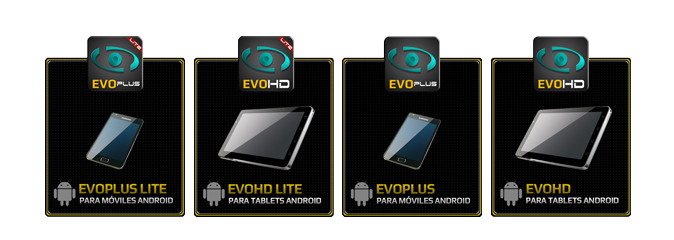 The distributor of electronic security equipment, By Demes, has announced the availability of the new EVO application, for remote viewing and management of Colosos Evolution video recorders on Smartphones. The application is compatible with iPhone, iPad y Android (Phone y Pad) and allows you to view the images from the cameras connected to the DVR in real time from anywhere at any time, as long as you have a Wi-Fi or 3G data connection on your smartphone..
For iPhone the application is called EVOPlus and for iPad it is called EVOHD, and can be downloaded from the Apple Store (available from 4 of may). There is also a free Lite version with limited options. For your part, For Android Phone the application is called EVOPlus (V. 2.1 onwards) and for Android Pad, EVOHD (V. 3.0 onwards), and can be downloaded from Android Market (now available). There is also a free Lite version with limited options. The new application, which replaces the old DMSS, maintains a similar interface, solves existing errors and has new functionalities that will improve the mobile remote access and management experience of Airspace's Colosos Evolution video recorders.
Las 5 main functions of the previous application are maintained, with interesting improvements:
– Device List: Allows you to add different video recorders by simply indicating the IP address of the recorder, as well as edit the video recorders already added.
– Favorite Devices Folder: Channels from the devices you access most frequently can be added for immediate viewing.
– Real Time Viewing: To select any channel on any of the devices and be able to view the images in full screen or 4 channels on a single screen, with the possibility of connecting to several DVRs at the same time
– Local Configuration: Allows you to adjust the movement speed of PTZ cameras and password access to the application.
4 new features
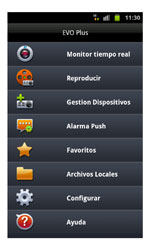 and are added 4 very useful features: Reproduction, List of events, Secondary stream configuration and Push Notification alarm reception.
Playback allows you to view existing recordings from a specific video recorder. You simply have to select the time interval (date / start time and date / final time) of which we want to see the recordings, and the channel of the video recorder that interests us. The program will automatically search the hard drive of the remote DVR and we will be able to play it, having a time bar to go to the exact moment of the recording that we want.
The Secondary Stream Configuration allows us to obtain the video streaming configuration (Secondary Stream, for remote viewing) of any of the video recorders that we have registered, and modify these parameters (resolution, images x second, type of bit rate and quality). Thanks to this, we can adjust at any time and remotely, the video stream and adapt it to our bandwidth, to obtain better performance.
Alarmas Push Notification
The List of Events and the Reception of Alarms Push Notification are two new options that allow you to take advantage of the latest functionality added to the Colosos Evolution video recorders. (check compatible models): Push Notification alarms. From now on, It is possible to configure the video recorders so that when an event occurs that we want to have instant notification (alarm, videosensor, etc), The video recorder will send a Push alert to mobile devices that have this option activated. These notifications are free, They are received on iPhone/ipad/Android smartphones and are similar to the notices received by other applications such as WhatsApp. They use the data network and the user receives them immediately on their smartphone or tablet even if they do not have the program active.
In the List of events we can access all the notifications received. And in Push Notification Settings, we can activate and deactivate this option, in all the video recorders that we have registered, We can select which channels and what types of alarm (videosensor, alarm input, etc.) we will receive on our smartphone.
This option is only available after the latest firmware update of the video recorders. If you want to use Push Notifications on older video recorders, consult our technical department, since an incorrect firmware update can cause incorrect operation of the equipment.
Ultimately, the new smartphone remote access application, demonstrates why Airspace's Colosos Evolution DVRs are the best-selling recorders on the market. Yes until now, These video recorders were characterized by a very powerful and simple local menu, and for complete PC software, From now on we can also say that they are the recorders with the best remote access by mobile device on the market.
All downloaded EVO programs have access to our test DVR so you can easily demonstrate to your clients.
The DVR models for which the Push Notification function is available today, are the following: SAM-1580, SAM-1581, SAM-1582, SAM-1583, SAM-1584, SAM-1585, SAM-1698 and SAM-1579. And in preparation: SAM-1330, SAM-1527, SAM-1528, SAM-1596, SAM-1597 and SAM-1595.
¿Te gustó este artículo?
Subscribe to our NEWSLETTER and you won't miss anything.